
HTML Heading Hierarchy: How to Structure H1–H6 for SEO, AI & Accessibility
HTML Heading Hierarchy
Ali Hamza
A well-organized webpage is more than just an aesthetic choice; it is a fundamental requirement for digital success. The underlying framework that provides this organization is its HTML heading structure. These headings, from H1 to H6, create a logical roadmap that guides search engines, AI systems, and human users through your content. Understanding how to use them correctly is essential for visibility, accessibility, and future-readiness in a world increasingly interpreted by algorithms.
This guide explores the critical role of heading tags and proper HTML hierarchy. We will cover how this structure impacts SEO, its growing importance for AI and Large Language Models (LLMs), how to use keywords strategically within headings, its non-negotiable function in web accessibility, and how to conduct a step-by-step audit of your heading structure.
What Are Heading Tags? (H1–H6 Explained)
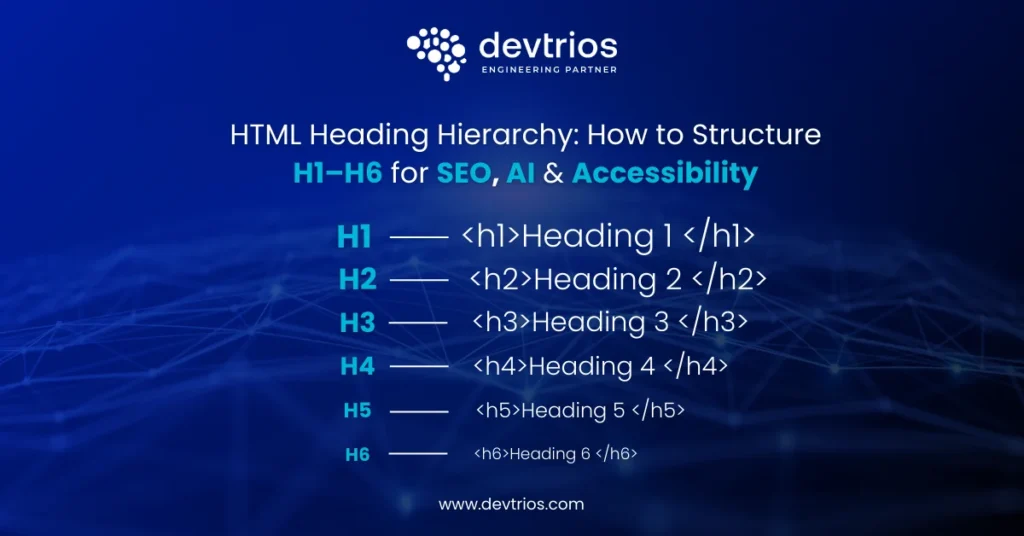
Heading tags are HTML elements, designated from <h1> to <h6>, that define the structure and hierarchy of content on a webpage. They signal the relative importance of sections, with H1 being the main title and H2–H6 representing nested subtopics. This semantic structure helps search engines, AI, and assistive technologies understand the document’s organization and key themes.
In simple terms, heading tags create an outline for your page. The <h1> is the title of the book, <h2> tags are the chapter titles, <h3> tags are sub-sections within those chapters, and so on. This logical flow is crucial for both machine and human comprehension.
📌 Note: Quick Clarification: <head> is the HTML document’s metadata container (invisible to users). <header> is a layout element for the top section of a page. Neither is the same as <h1>–<h6> heading tags, which define content structure. This is one of the most common points of confusion for developers and content editors.
Is Your Website’s Heading Structure Costing You Rankings?
Poor HTML hierarchy doesn’t just affect readability it impacts SEO visibility, AI parsing, featured snippets, and WCAG accessibility compliance. We audit and restructure heading frameworks (H1–H6) to ensure clean semantic architecture, keyword alignment, crawl efficiency, and AI-ready formatting. If your site has multiple H1s, skipped levels, or headings used for styling, it’s time to fix the foundation.
Request a Technical SEO Structure Audit →Basic HTML Heading Structure Example
					<h1>Main Title of the Page</h1>
  <h2>First Main Section</h2>
	<p>Some introductory text for the first section.</p>
	<h3>A Subsection of the First Section</h3>
  	<p>Detailed content for the subsection.</p>
  <h2>Second Main Section</h2>
	<p>Introductory text for the second section.</p>
This hierarchy makes it immediately clear that the “First Main Section” and “Second Main Section” are of equal importance, and that “A Subsection” is a component of the first main section.
Summary of Heading Tag Roles
| Tag | Name | Purpose | Recommended Length |
|---|---|---|---|
| <h1> | Heading 1 | Main title or primary topic of the entire page. Typically only one per page. | 20–70 characters |
| <h2> | Heading 2 | Defines main sections. Primary subtopics that directly support the H1. | 20–60 characters |
| <h3> | Heading 3 | Breaks down H2 sections into more specific points. | 20–60 characters |
| <h4> | Heading 4 | Subdivides H3 sections for even more granular organization. | No strict limit |
| <h5> | Heading 5 | Organizes content within an H4 section. Less common but useful for detailed documents. | No strict limit |
| <h6> | Heading 6 | Lowest level of subheading. Often used for fine-print details or notes. | No strict limit |
Title Tag vs. H1 Tag: What’s the Difference?
One of the most commonly asked questions in SEO is the difference between the <title> tag and the <h1> tag. They are not the same thing, and confusing them is a frequent source of structural errors.
The title tag lives in the <head> section of your HTML document. It is completely invisible on the page itself, but it is what appears in the browser tab and as the blue clickable link in Google’s search results. The H1 tag lives in the <body> of your document and is the first heading a user sees when they land on your page.
| Aspect | Title Tag | H1 Tag |
|---|---|---|
| Location in HTML | <head> (document metadata) | <body> (visible content) |
| Visible to users? | No — shown in browser tab and SERPs | Yes — displayed on the page |
| Recommended count | One per page | One per page (best practice) |
| Ideal length | 50–60 characters | 20–70 characters |
| Primary purpose | Click-through rate in search results | Page structure and user experience |
| Keyword priority | Primary keyword near the start | Primary keyword near the start |
Do They Need to Be the Same?
No — and often they shouldn’t be. The title tag is optimized for clicks in the SERP, so it should be concise, keyword-forward, and compelling. The H1 can be slightly more descriptive or conversational since the user is already on your page.
Example: Title tag: “HTML Heading Hierarchy Guide: H1–H6 for SEO” | H1: “HTML Heading Hierarchy: How to Structure H1–H6 for SEO, AI & Accessibility”
How CMS Platforms Handle Title Tags and H1s
In WordPress, the post or page title field auto-generates both the H1 on the page and the browser title tag. By default, they are identical. However, plugins like Yoast SEO and RankMath let you write a separate SEO title, which is best practice allowing you to optimize the SERP title for clicks without changing the on-page H1.
In Shopify, the product and collection page titles are automatically wrapped in an H1. The SEO title is managed separately in the “Search engine listing” section. In page builders like Elementor and Divi, take care to distinguish between styling a text element to look like a heading and actually assigning it a semantic heading tag level.
Why Heading Structure Matters in 2026
A logical heading structure is no longer a minor technical detail; it is a critical component for modern digital communication. Its influence extends far beyond visual formatting, directly impacting how machines interpret your content and how all users, regardless of ability, access your information. In 2026, with the dominance of AI-driven search and stringent accessibility standards, a flawed hierarchy can render your content invisible or unusable.
For Search Engines
A proper heading hierarchy provides search engines with a clear map of your content’s thematic structure. This allows crawlers to quickly understand the main topics and the relationships between different pieces of information on the page. This clarity helps search engines index your content more accurately and efficiently.
Search engines use heading structure to:
Determine Topic Relevance: The text within heading tags, especially the H1 and H2s, carries significant weight in helping Google understand what the page is about.
Improve Crawl Efficiency: A logical structure allows search engine bots to parse the page layout and content priorities quickly, ensuring important information is not missed.
Generate Search Snippets: Well-defined sections under clear headings are often used to generate featured snippets. H2 and H3 tags phrased as questions (“How do heading tags improve accessibility?”) are particularly effective at earning these positions.
Understand Context: The nesting of headings (e.g., an H3 under an H2) provides contextual clues about how different concepts are related, which is vital for semantic search.
For AI & Large Language Models
AI systems and Large Language Models (LLMs) like Google’s Gemini and OpenAI’s GPT rely heavily on structural data to process and understand content. A clean heading hierarchy is a primary source of this data, enabling these models to perform tasks like summarization, passage extraction, and direct answer generation with much greater accuracy.
LLMs don’t “read” a page visually they parse its underlying HTML code. A clean H1 → H2 → H3 structure provides an unambiguous outline for the model to follow. Proper heading structure is essential for:
Passage Extraction and Ranking: AI can isolate specific sections of your content (passages) to answer highly specific queries. A clear H2 or H3 heading acts as a label for the content block that follows, making it easier for AI to identify and extract that passage as a standalone answer.
AI Overview Generation: When AI Overviews synthesize information from multiple sources, pages with a clear, logical structure are more likely to be parsed correctly and have their key points included in the generated summary.
Entity and Topic Recognition: The hierarchical nature of headings helps AI models map the relationships between different entities and concepts on a page, leading to a more sophisticated understanding of the content.
Structural Parsing: A clean H1 → H2 → H3 structure provides an unambiguous outline for the machine to follow, preventing misinterpretation of the content’s flow and importance.
For Accessibility & WCAG
For users who rely on assistive technologies like screen readers, heading structure is the primary method of navigating a webpage. The Web Content Accessibility Guidelines (WCAG) identify the use of proper headings as a critical success criterion. A page without a logical heading hierarchy is like a book without a table of contents.
Headings are fundamental for accessibility because they allow users to:
Understand Page Layout: A screen reader can announce the headings, giving a user a quick overview of the page’s content and organization without needing to listen to every word.
Navigate Efficiently: Users can jump directly from one heading to the next, skipping irrelevant sections. A screen reader user can pull up a list of all H2s on a page to navigate to their desired chapter.
Maintain Context: Correctly nested headings help users understand where they are within the document’s structure.
What Is Proper Heading Hierarchy?
Proper heading hierarchy is the practice of organizing HTML heading tags in a logical, sequential order without skipping levels. The structure must always begin with a single H1 and proceed downward through H2, H3, and so on, as needed. This creates a nested outline that accurately reflects the content’s organization, where each lower-level heading relates to the parent heading above it.
Think of it as a formal outline for a research paper. You wouldn’t have sub-point ‘a’ without a main point ‘1’ above it. The same logic applies to HTML headings.
Correct Heading Structure Example
					<h1>The Solar System</h1>
  <h2>Inner Planets</h2>
	<h3>Mercury</h3>
  	<p>Details about Mercury...</p>
	<h3>Venus</h3>
  	<p>Details about Venus...</p>
  <h2>Outer Planets</h2>
	<h3>Jupiter</h3>
  	<p>Details about Jupiter...</p>
	<h3>Saturn</h3>
  	<p>Details about Saturn...</p>
Why it’s correct: The structure flows from H1 to H2 to H3 without skipping any levels. It provides a clear and logical map of the content.
Incorrect Heading Structure Example
					<h1>The Solar System</h1>
  <h4>Inner Planets</h4>
	<h6>Mercury</h6>
<h1>Outer Planets</h1>
  <h2>Jupiter</h2>
Why it’s incorrect: The structure jumps from H1 to H4, confusing both search engines and screen readers. The second H1 creates ambiguity about the page’s primary topic.
Do Heading Tags Affect SEO Rankings?
Yes, heading tags indirectly affect SEO rankings by improving user experience and helping search engines understand your content’s topic and structure. While they are not a direct, high-impact ranking factor like backlinks, their proper use contributes to better on-page SEO, which can lead to higher rankings. A well-structured page is more likely to be indexed correctly, engage users, and earn featured snippets.
The SEO impact of heading tags can be broken down into three main areas:
Topic Clarity and Relevance: Headings are strong signals of content relevance. Including target keywords and related terms in your H1, H2, and H3 tags helps Google’s algorithms confirm that your page is a strong match for a user’s query.
Crawlability and Indexing: A clean heading hierarchy allows search engine crawlers to parse your page more efficiently, ensuring the page is indexed accurately for its intended topics.
User Engagement Signals: Good structure enhances readability and navigation, which keeps users on your page longer. Positive user experiences contribute to better engagement signals (dwell time, lower bounce rates), which Google considers when evaluating page quality.
How to Use Keywords in Heading Tags
Heading tags are prime real estate for keyword placement. However, the goal is strategic relevance, not mechanical repetition. Here is how to approach keyword use at each heading level.
H1: Lead with Your Primary Keyword
Your primary target keyword should appear in the H1, ideally near the beginning of the tag. Google places significant weight on H1 text when determining a page’s core topic. If your primary keyword is “HTML heading hierarchy,” a strong H1 would be:
📌 Note: Strong: “HTML Heading Hierarchy: How to Structure H1–H6 for SEO” | Weak: “A Complete Guide to Understanding and Implementing HTML Heading Hierarchy” (keyword buried at the end)
H2s: Use Semantically Related Terms
Your H2s should cover the main subtopics of the page, naturally incorporating related keyword variations. If your H1 targets “HTML heading hierarchy,” your H2s might use: “heading structure,” “heading tags,” “H1 tag best practices,” and “SEO impact of headings.” This supports topical depth without repetitive exact-match stuffing and mirrors the way semantic search engines understand content clusters.
H3s: Target Question-Format Phrases
H3 tags are highly effective for capturing featured snippets and People Also Ask positions. Phrase them as questions your audience is actually searching for. Instead of a vague “Accessibility Benefits,” use “How Do Heading Tags Improve Accessibility?” The question format signals directly to both users and AI that this section answers a specific query.
Turn Your Content Structure into a Competitive Advantage
In 2026, ranking is not just about content volume it is about clean semantic architecture. We help businesses design and optimise heading hierarchies that improve crawl clarity, AI interpretation, featured snippet eligibility, and accessibility compliance. From single-page audits to full-site structural restructuring, we ensure your H1–H6 framework supports real search visibility and long-term scalability.
Book a Structure & SEO Review →Before and After: Keyword-Optimized Heading Outline
| Level | Generic (Weak) | Keyword-Optimized (Strong) |
|---|---|---|
| H1 | A Guide to Headings | HTML Heading Hierarchy: How to Structure H1–H6 for SEO |
| H2 | Why They Matter | Why Heading Structure Matters for SEO and AI in 2026 |
| H2 | Mistakes | Common Heading Structure Mistakes to Avoid |
| H3 | Accessibility | How Do Heading Tags Improve Web Accessibility? |
| H3 | Audit Info | How to Audit Your Website’s Heading Structure (Step-by-Step) |
What to Avoid
Exact-match repetition: Using the same keyword phrase across H1, H2, and multiple H3s looks spammy and provides no additional semantic value.
Forced keywords: If a keyword does not fit naturally into a heading, do not force it. Awkward phrasing damages both credibility and user experience.
Keyword stuffing in H4–H6: These lower-level tags carry minimal SEO weight. Focus on readability and structure rather than keyword density at these levels.
Common Heading Structure Mistakes to Avoid
Many websites undermine their own SEO, accessibility, and AI-readiness by making simple, avoidable errors in their heading structure. These mistakes can create confusion for both users and machines, diluting the impact of your content.
Skipping Heading Levels: The most common mistake is jumping from an H1 to an H3, or an H2 to an H4. The hierarchy must be sequential.
Using Multiple H1 Tags: A page should have only one H1 tag that defines its single, primary topic. Multiple H1s can create ambiguity for search engines about the page’s main subject. Note: Google’s John Mueller has confirmed that multiple H1s are not a direct ranking penalty, but a single H1 remains strongly recommended best practice for clarity and accessibility.
Confusing Title Tag and H1: These are separate elements with different purposes. Not optimizing each independently is a missed opportunity.
Using Headings for Styling: Never choose a heading tag based on its default font size or style. Use H2, H3, etc. for semantic structure only and use CSS to control visual appearance.
Creating Vague or Generic Headings: Headings like “Introduction,” “More Info,” or “Conclusion” provide no semantic value. Make your headings descriptive and keyword-rich.
Overstuffing Headings with Keywords: While headings should contain keywords, they must remain natural and readable. Awkwardly stuffing keywords into every heading looks spammy.
Having No Heading Structure at All: A wall of text with no H1, H2, or H3 tags is nearly impossible for search engines to parse and for users to read.
Inconsistent Hierarchy: Starting one section with an H2 and a similar, parallel section with an H3 creates a confusing and illogical outline.
Headings in Sidebars, Navigation, and Footers: Some themes and page builders use H2 or H3 tags to label widget areas like “Recent Posts” or “Categories.” Search engine crawlers read these as part of the page’s semantic outline. Use <p> tags or CSS-styled <span> elements for UI labels that are not part of the main content.
Fix Your Heading Structure Before It Hurts Rankings
Clean H1–H6 hierarchy improves SEO clarity, AI visibility, and accessibility compliance. We audit and restructure your site to ensure it’s technically sound and future-ready.
Get a Heading Structure Audit →How to Audit Your Heading Structure (Step-by-Step)
Method 1: Single-Page Check with a Browser Extension
This is the fastest way to inspect any individual page without installing desktop software.
Install the “SEO META in 1 CLICK” Chrome extension (free).
Navigate to any page you want to audit.
Click the extension icon and go to the “Headers” tab.
You will see a visual tree of every heading on the page in order.
Look for: missing H1, multiple H1s, any jump in heading levels (e.g., H2 followed immediately by H4), and headings appearing in sidebars or footers that pollute the outline.
Method 2: Site-Wide Audit with Screaming Frog
For auditing an entire website at scale, SEO crawlers are essential.
Download and open Screaming Frog SEO Spider.
Enter your domain URL and run a full crawl.
Go to the H1 tab to view all pages — look for “Missing,” “Duplicate,” and “Multiple” H1 flags.
Go to the H2 tab for the same review.
Use Bulk Export > All Headings to download a full spreadsheet of every heading tag on every page, organized by URL. This is the most efficient way to review heading structure at scale.
Sort by URL and visually scan the heading sequence for any level that jumps (e.g., H2 followed by H4 with no H3).
Method 3: Site-Wide Audit with Semrush
Log into Semrush and run a Site Audit on your domain.
Once the crawl is complete, go to Issues and filter by “H1.”
Look specifically for: “Multiple H1 tags,” “Missing H1 tag,” and “H1 tag is too long/short.”
Semrush also flags skipped heading levels under its Warnings category.
Prioritize fixes on your highest-traffic pages first.
What to Fix First
| Issue | Priority | Impact |
|---|---|---|
| Missing H1 | Critical | Page has no primary topic signal for search engines or screen readers. |
| Multiple H1s | High | Dilutes topic clarity; confuses assistive technology. |
| Skipped heading levels | High | Breaks semantic outline; WCAG accessibility violation. |
| Headings used for styling only | Medium | Wrong semantic signals; creates visual-structural mismatch. |
| Vague heading text | Medium | Misses keyword opportunity; provides no scan value for users. |
| Headings in sidebars/footers | Medium | Pollutes semantic page outline; may confuse crawlers. |
Conclusion
HTML heading hierarchy is not a cosmetic detail. It is a structural foundation that determines how search engines index your page, how AI systems interpret your content, and how accessible your website is to all users. A clear H1–H6 structure acts as a blueprint for machines and a navigation system for humans.
When implemented correctly, headings:
Define a single, unambiguous primary topic with one H1
Organize supporting sections logically with sequential H2–H3 nesting
Strengthen keyword relevance without repetition or stuffing
Improve crawl efficiency and passage extraction for AI systems
Enable screen reader users to navigate content effectively
Increase eligibility for featured snippets and AI-generated summaries
In 2026 and beyond, search is increasingly semantic and AI-driven. Large Language Models do not scan your design. They parse your structure. If your hierarchy is broken, your meaning is diluted. If your structure is clean, your content becomes easier to extract, summarise, rank, and trust.
The rule remains simple: one clear H1, logical nesting, no skipped levels, no headings used for styling, and no vague labels. Treat headings as structural signals, not visual shortcuts.
If you are reviewing your website’s structure as part of a broader SEO, accessibility, or AI-readiness initiative, it is worth conducting a full structural audit across service pages, blog content, and landing pages. For businesses looking to align technical SEO, content architecture, and scalable web development under one strategy, Devtrios provides structured audits and implementation support across websites, SaaS platforms, and custom digital systems.
A well-structured page is easier to understand, easier to rank, easier to summarise, and easier to use. That is not just best practice. It is essential digital infrastructure.
Poor heading structure silently weakens your SEO and AI visibility.
Skipped H-levels, multiple H1s, vague headings, and styling misuse confuse search engines, AI models, and assistive technologies. We audit and rebuild H1–H6 frameworks to improve crawl clarity, featured snippet eligibility, and WCAG compliance strengthening your technical SEO foundation at scale.
Get a Technical Heading Audit →Frequently Asked Questions (FAQs)
Heading hierarchy is the logical arrangement of heading tags (H1–H6) on a webpage to create a structured outline of the content. It starts with a single H1 for the main title, followed by H2s for main sections, H3s for subsections, and so on. A proper hierarchy never skips levels (e.g., from H1 to H3).
No. A proper HTML structure is sequential. Jumping from an H1 to an H3 or an H2 to an H4 breaks the logical outline of the page. This is confusing for search engine crawlers and creates significant navigation problems for users who rely on screen readers for accessibility.
Yes, heading tags are critically important for accessibility. They are the primary way users with screen readers navigate a webpage. A logical heading structure allows these users to quickly get an overview of the content and jump to the specific section they need, making the web usable for people with visual impairments. Proper heading use is a core WCAG success criterion.
For long-term reliability, security, and scalability, an agency is generally better. Agencies provide continuity if one developer leaves, the project continues. Freelancers can be a risk for critical business infrastructure.
Yes, heading tags directly affect a page’s eligibility and accuracy within AI Overviews. AI models rely on a clean heading structure to parse content, identify key topics, and extract relevant passages for summarization. Pages with a clear, logical hierarchy are more easily understood by AI and are more likely to be featured in generated summaries.
The title tag is in the <head> of your HTML and appears in browser tabs and Google’s search results. It is invisible on the page itself. The H1 tag is in the <body> and is the first heading visible to users on the page. They should both contain your primary keyword but can have different wording — the title tag optimized for clicks in the SERP, the H1 optimized for on-page clarity.
Best practice is one H1 per page. Google’s John Mueller has stated that multiple H1s are not a direct ranking penalty, and the HTML5 specification technically permits multiple H1s within sectioned elements. However, a single, clear H1 is recommended by almost all SEO professionals because it provides an unambiguous topic signal to both search engines and assistive technology users.
Yes, but strategically. Your H1 should include your primary keyword near the start. H2s should use semantically related terms and variations. H3s work well as question-formatted phrases that target featured snippets. Avoid repeating the exact same keyword across multiple headings or stuffing keywords in a way that makes the heading unnatural to read.
No. Most pages only require H1 through H3, and sometimes only H1 and H2. You should only use a heading level when your content genuinely needs that level of sub-division. Using H4, H5, or H6 just to add visual variety or break up text without a structural reason creates unnecessary complexity in your document outline.
About the Author
This article is written by Ali Hamza, a digital strategist and technology writer with hands-on experience in product development, emerging technologies, SEO, and scalable digital systems. He focuses on translating complex technical topics into clear, practical guidance that helps readers make informed decisions.
Ali regularly researches consumer technology trends, software platforms, and digital optimization strategies, ensuring content accuracy, usability, and real-world relevance across a wide range of topics.
View Author Profile →